Monday, July 13, 2015

Installing Alchemy Plugins for Tridion


Before installing an Alchemy Plugin, you must install Alchemy on your CMS server. Once finished, an Alchemy Plugin could be installed in two ways:


1. First one is to access the web store inside your Tridion GUI and install it clicking on install button. 
  •     Go to the Web Store by clicking the tab "web store" on Alchemy landing page, Search for the plugin you want to install.


  •     On the search result page, click the plugin you want to install


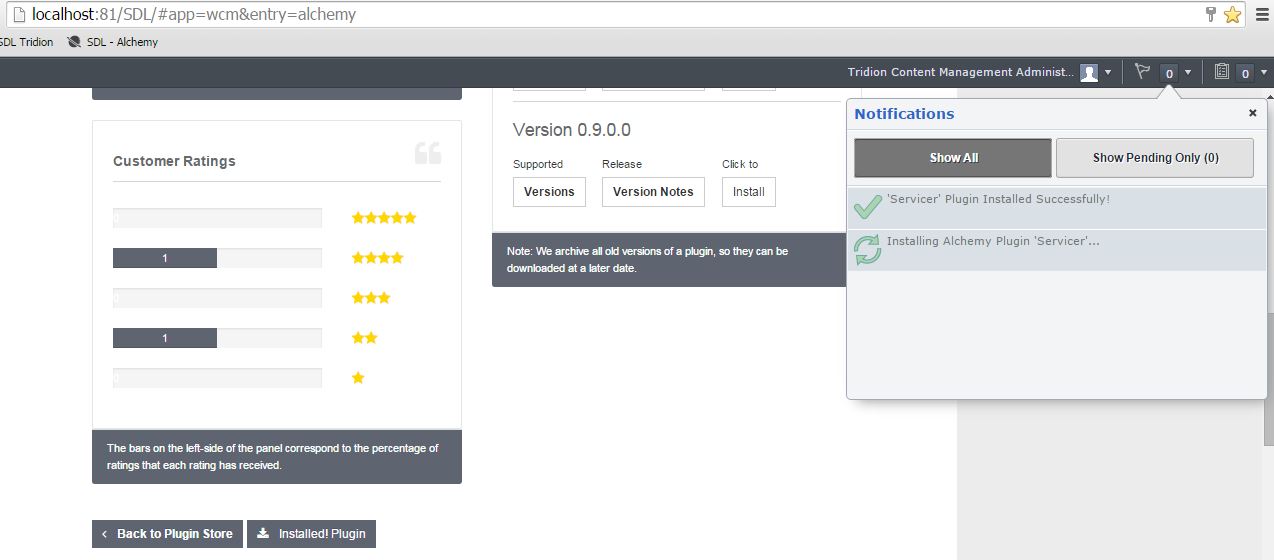
  • It will redirect you to the Plugin page, Locate to the "Install Plugin" button and click it

  • Watch the Tridion notifications about the progress


  • Great, your Plugin is installed and ready to use 


2. The other way to install a Plugin is to go to  
www.alchemywebstore.com and download the plugin (a4t file) and drag and drop it on the Alchemy landing page inside the Tridion GUI.


Installing Alchemy for Tridion (A4T)

As a Tridion developers we all know, Developing a Tridion GUI Extension is not a piece of cake. Form developing the code to the configuration, It's a complex process that requires some good technical skills and time.


So here comes Alex Klock and his team to rescue. They developed a system called Alchemy at Content Bloom, and the Beta version is announced recently.


Alchemy is basically a system set to revolutionize the way Tridion Extensions are built and installed. The system comprises of a open source extension framework to develop the extension plugins and a web store to upload/download and manage plugins.

So to use the Alchemy Plugins, First We need to install this awesome thing named Alchemy.


  • Run the installer on your CMS server

 Installation wizard starts


Specify the installation location for Alchemy


Specify the system admin credentials (Optional) needed for plugins like "Servicer", which performs some system administrative task like restating a window service. If you skip this, you can update this information post-install as well, these are stored in the "impersonation" node of the Alchemy.xml file found at: [Tridion Home]\web\Alchemy\Configuration\ 


Click Close once installation is complete


  • Refresh Tridion in browser. Boom!!! Welcome to the world of alchemy.


  • Click on the Alchemy link in left panel, it will show you the Alchemy landing page. And yeah, you are all set to install Alchemy plugins for the environment. 


Monday, May 4, 2015

Publishing Category keyword hierarchy as XML

Tridion Bite : Fetch taxonomies in RDF/OWL-Lite format from cms to improve performance.

Many a times, we need category keywords hierarchy as xml file on presentation server for different purposes. The common way to implement it in templating is to iterate through the categories and keywords structure to produce a xml document and add it as output.

This works great but this doesn't result in a good publishing performance. Especially if the publishing threads are limited and so other items keep waiting for publish in the queue.

So here is an alternative approach, which quite faster as compared to the previous one:
  • Use Repository.GetTaxonomiesOwl() method to get the taxonomies in a repository in RDF/OWL-Lite format.
  • Write a xslt to apply on the taxonomies results and add it as “Embedded Resource” in your templating solution.
  • Transform the xml (RDF/OWL-Lite) using xslt and add the result to the output.


1. Use Repository.GetTaxonomiesOwl() method to get the taxonomies in this Repository in RDF/OWL-Lite format:

We get the results like below:


from the cms structure:


2. Write xslt  and add it as “Embedded Resource” in your templating solution:

The xslt code:

<?xml version="1.0"?>
<xsl:stylesheet version="1.0"
xmlns:xsl="http://www.w3.org/1999/XSL/Transform" xmlns:owl="http://www.w3.org/2002/07/owl#" xmlns:rdf="http://www.w3.org/1999/02/22-rdf-syntax-ns#" xmlns:rdfs="http://www.w3.org/2000/01/rdf-schema#" xmlns:xsd="http://www.w3.org/2001/XMLSchema#" xmlns:tcmt="http://www.tridion.com/ContentManager/5.2/Taxonomies#" xmlns:tcmc="tcm:0-9-1/Categories#">

  <xsl:template match="/rdf:RDF">
    <publication>
    <xsl:apply-templates select="tcmt:Taxonomy"/>
    </publication>
  </xsl:template>

  <xsl:template match="tcmt:Taxonomy">
    <category>
      <xsl:attribute name="id" >
        <xsl:value-of select="@rdf:about" />
      </xsl:attribute>
      <xsl:for-each select="tcmt:rootKeyword">
        <xsl:call-template name="keyword">
          <xsl:with-param name="tcmId" select="@rdf:resource"/>
         </xsl:call-template>
      </xsl:for-each>
    </category>
  </xsl:template>

  <xsl:template name="keyword">
    <xsl:param name = "tcmId" />
        <keyword>
          <xsl:attribute name="id" >
            <xsl:value-of select="$tcmId" />
          </xsl:attribute>
          <xsl:attribute name="title" >
            <xsl:value-of select="/rdf:RDF/*[@rdf:about = $tcmId]/rdfs:label" />
          </xsl:attribute>
          <xsl:for-each select="/rdf:RDF/*[@rdf:about = $tcmId]/tcmt:childKeyword">
            <xsl:call-template name="keyword">
              <xsl:with-param name="tcmId" select="@rdf:resource"/>
            </xsl:call-template>
          </xsl:for-each>
        </keyword>
  </xsl:template>
</xsl:stylesheet>

Add it as "OwlTaxonomies.xml" to the solution as below:


Make the file a embedded resource by  selecting build action to "Embedded Resource" in file properties:


3. Transform the xml (RDF/OWL-Lite) using xslt and add the result to the output (The Example Code):


[TcmTemplateTitle("Generate Taxonomy Xml")]
    class GenerateTaxonomyXml : TemplateBase
    {

        /// <summary>
        /// Main function for TBB. Starting point of TBB code.
        /// </summary>
        public override void Transform(Engine engine, Package package)
        {
            // Call the base function to initialize the engine and package objects.
            Initialize(engine, package);
            Publication pub = GetPublication();
            var repo = GetPublication() as Repository;
            TaxonomiesOwlFilter fltr = new TaxonomiesOwlFilter(repo.Session);
            var taxonomies = repo.GetTaxonomiesOwl();

            // Load the style sheet.
            XslCompiledTransform xslTransformer = new XslCompiledTransform();

            //load the Xsl from the assembly
            Stream xslStream = LoadResourceAsStream("MyTest.TemplateBuildingBlocks.Resources.OwlTaxonomies.xslt");
            xslTransformer.Load(XmlReader.Create(xslStream));

            string strXmlListItems = taxonomies.OuterXml;
            StringReader srXml = new StringReader(strXmlListItems);
            XmlReader readerXml = new XmlTextReader(srXml);

            // Execute the transform and output the results to a file.
            StringWriter sw = new StringWriter();
            XmlWriter writer = new XmlTextWriter(sw);
            xslTransformer.Transform(readerXml, writer);

            package.PushItem("Output", package.CreateStringItem(ContentType.Xml, sw.ToString()));
        }

        private Stream LoadResourceAsStream(string resourceName)
        {
            var assembly = Assembly.GetExecutingAssembly();
            return assembly.GetManifestResourceStream(resourceName);
        }

    }

The Output:

<?xml version="1.0" encoding="utf-8"?>
<publication xmlns:owl="http://www.w3.org/2002/07/owl#" xmlns:rdf="http://www.w3.org/1999/02/22-rdf-syntax-ns#" xmlns:rdfs="http://www.w3.org/2000/01/rdf-schema#" xmlns:xsd="http://www.w3.org/2001/XMLSchema#" xmlns:tcmt="http://www.tridion.com/ContentManager/5.2/Taxonomies#" xmlns:tcmc="tcm:0-9-1/Categories#">
  <category id="tcm:9-5039-512">
    <keyword id="tcm:9-5256-1024" title="Level1 - Test Keyword1">
      <keyword id="tcm:9-5257-1024" title="Level2 - Test Keyword1" />
    </keyword>
    <keyword id="tcm:9-5258-1024" title="Level1 - Test Keyword2 - (localized)">
      <keyword id="tcm:9-5259-1024" title="Level2 - Test Keyword2" />
    </keyword>
    <keyword id="tcm:9-5260-1024" title="Local Keyword" />
  </category>
  <category id="tcm:9-5040-512" />
  <category id="tcm:9-5041-512" />
</publication>